← TivuStream Suite

TivuStream Profile Builder

Un profilo nuovo e pulito, solo con gli account che vuoi. A clean new profile, with only the accounts you want.

Per Betterbird e Thunderbird su Windows. Analizza il profilo che usi oggi, ti fa scegliere quali account portare con te e ne costruisce uno nuovo, senza reinserire server, identità e impostazioni. Il vecchio profilo resta esattamente com'era. For Betterbird and Thunderbird on Windows. It analyzes the profile you use today, lets you choose which accounts to bring along and builds a new one, without retyping servers, identities and settings. Your old profile stays exactly as it was.

GratuitoFree Open sourceOpen source 100% locale100% local Nessuna password decifrataNo password decrypted Niente da installareNothing to install Betterbird · Thunderbird Windows 10 · 11

Versione 1.0.0 · ZIP portable da 14 MB · codice sorgente pubblico, licenza GPL v3. Version 1.0.0 · 14 MB portable ZIP · public source code, GPL v3 licence.
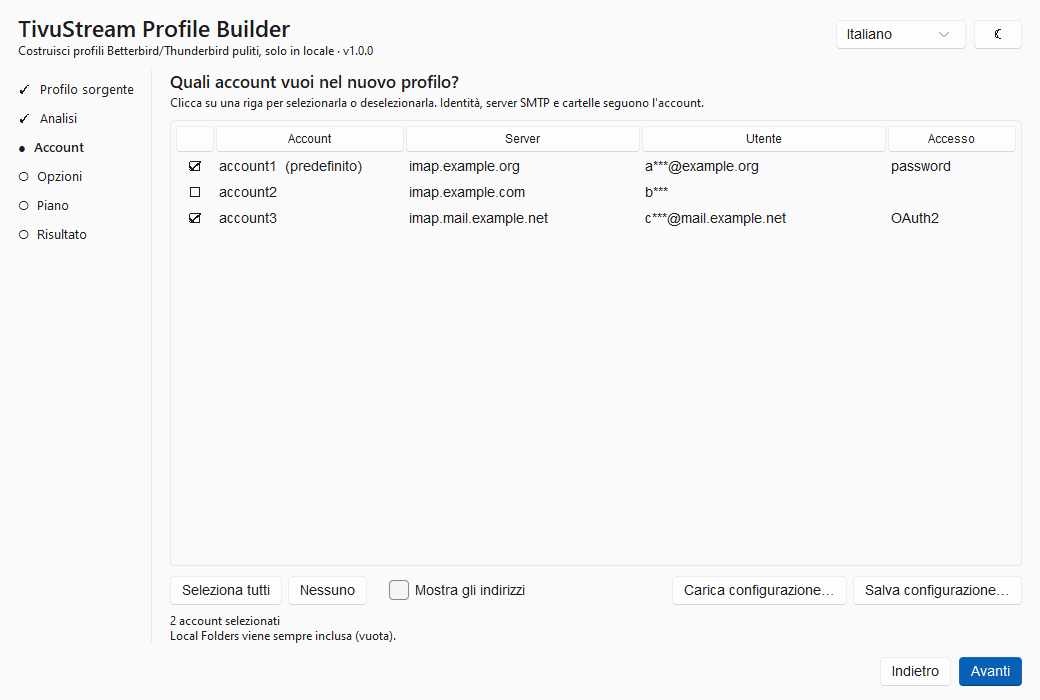
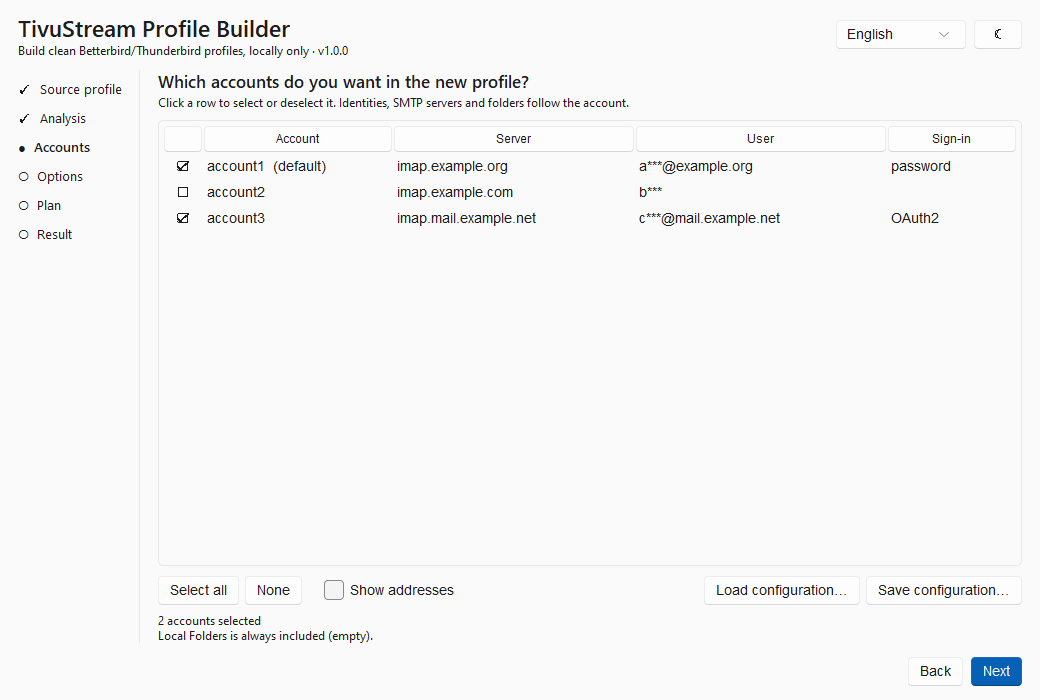
La schermata di selezione degli account The account selection screen

Scegli gli account: identità, server SMTP e cartelle seguono il proprio account. Choose the accounts: identities, SMTP servers and folders follow their account.
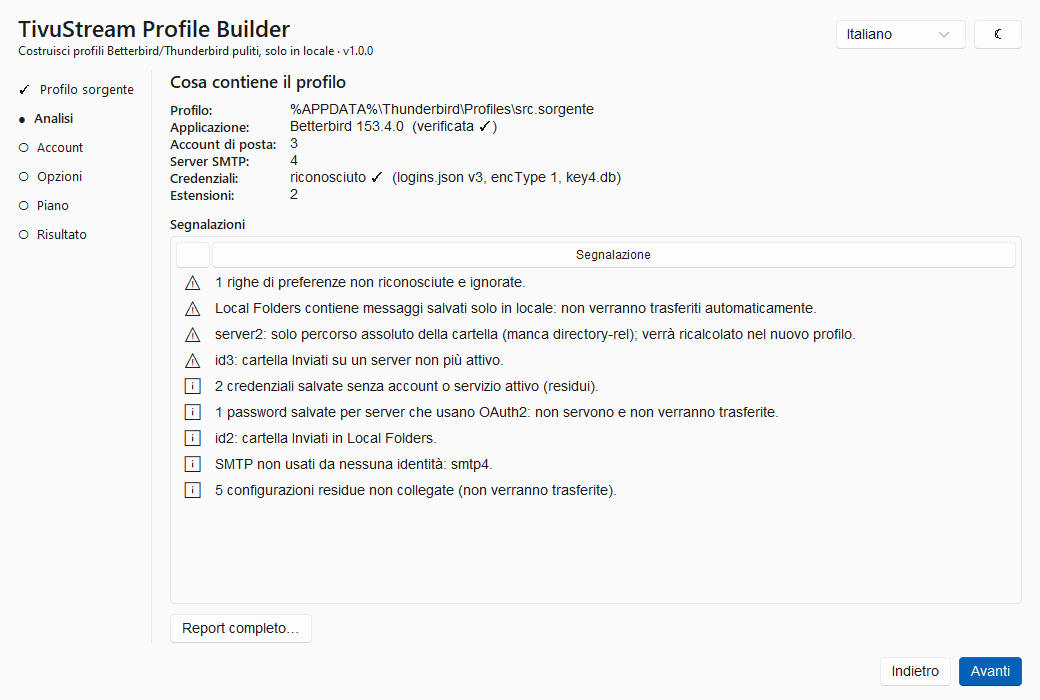
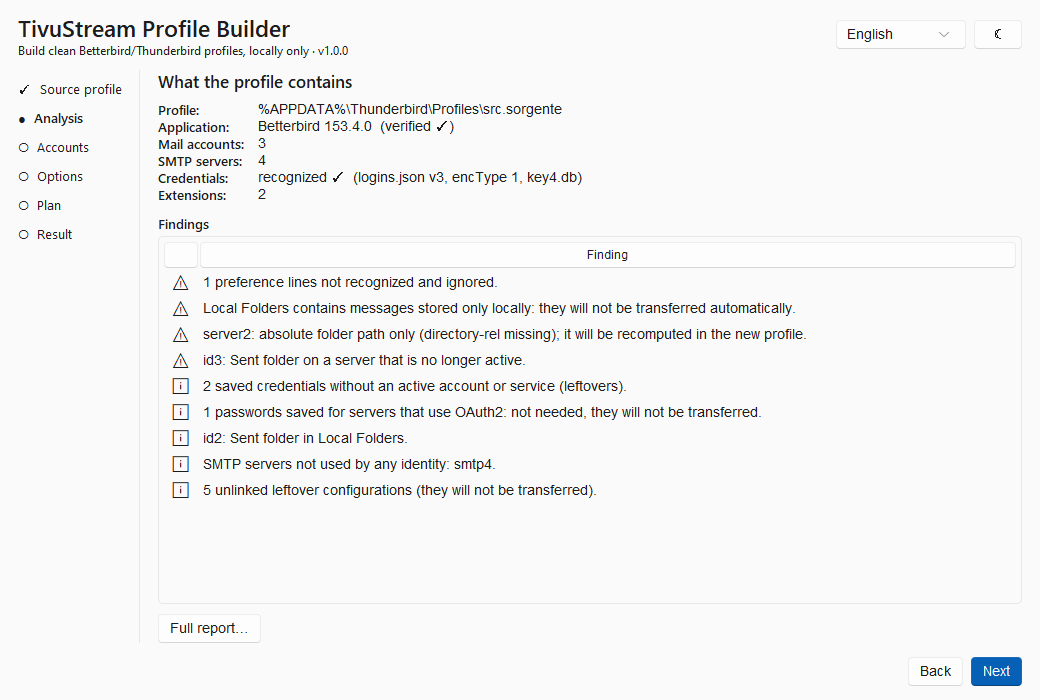
Un profilo che negli anni si è riempitoA profile that filled up over the years

Account che non usi più, server SMTP rimasti orfani, password salvate per caselle chiuse da tempo, lo stesso indirizzo configurato due volte. Ripartire da zero vuol dire reinserire tutto a mano; copiare il vecchio profilo vuol dire portarsi dietro anche il disordine. Profile Builder fa la terza cosa: legge il profilo che hai, ti mostra cosa contiene e ne costruisce uno nuovo con i soli pezzi che servono, collegati nel modo giusto. Accounts you no longer use, orphaned SMTP servers, passwords saved for mailboxes closed long ago, the same address configured twice. Starting from scratch means typing everything again; copying the old profile means bringing the mess along. Profile Builder does the third thing: it reads the profile you have, shows you what is in it and builds a new one with only the pieces you need, wired together correctly.

Come funzionaHow it works

Una procedura guidata in sei passi. Fino all'ultimo clic non viene scritto nessun file. A six-step wizard. Not a single file is written until the last click.

1

AnalizzaAnalyze

Scegli il profilo di partenza. Il programma lo legge e ti mostra account, identità, server, credenziali salvate, estensioni e i residui che non servono più. Pick the starting profile. The program reads it and shows you accounts, identities, servers, saved credentials, extensions and the leftovers you no longer need.

2

ScegliChoose

Spunta gli account da portare nel nuovo profilo e dagli un nome. Puoi salvare la scelta e riusarla, anche per creare più profili dallo stesso punto di partenza: Personale, Lavoro, Test. Tick the accounts for the new profile and give it a name. You can save the selection and reuse it, even to create several profiles from the same starting point: Personal, Work, Test.

3

Controlla e costruisciCheck and build

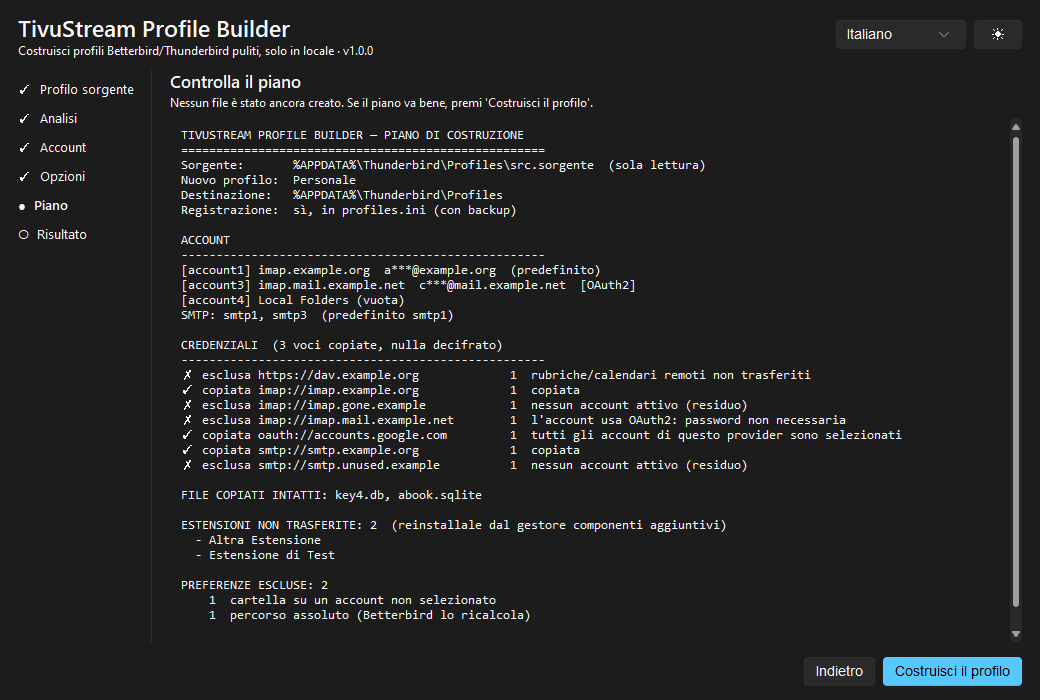
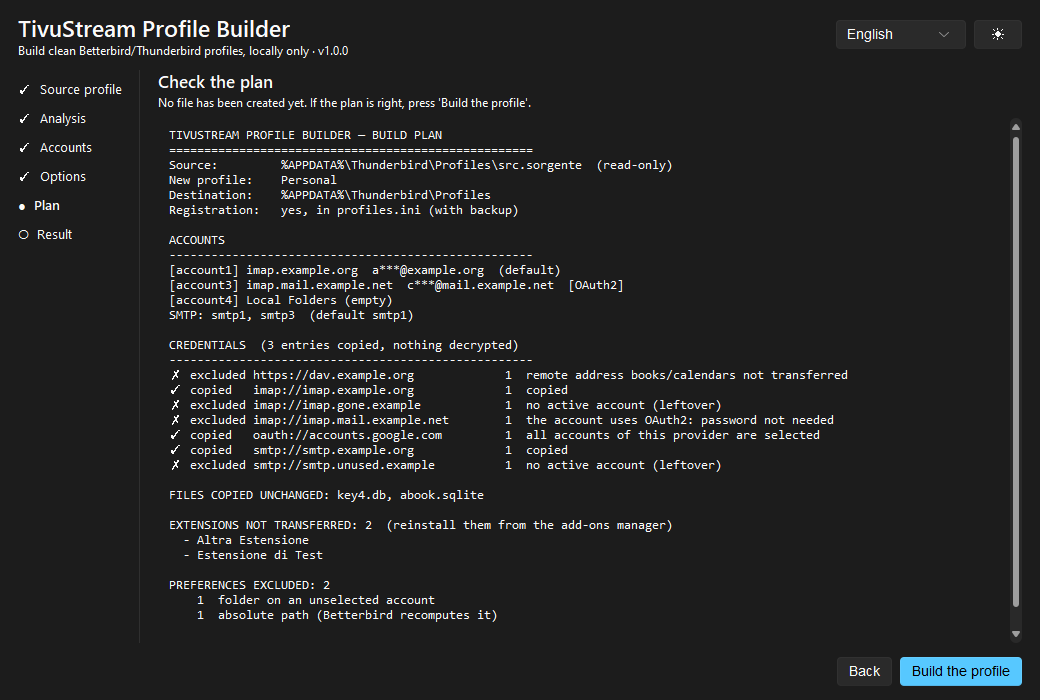
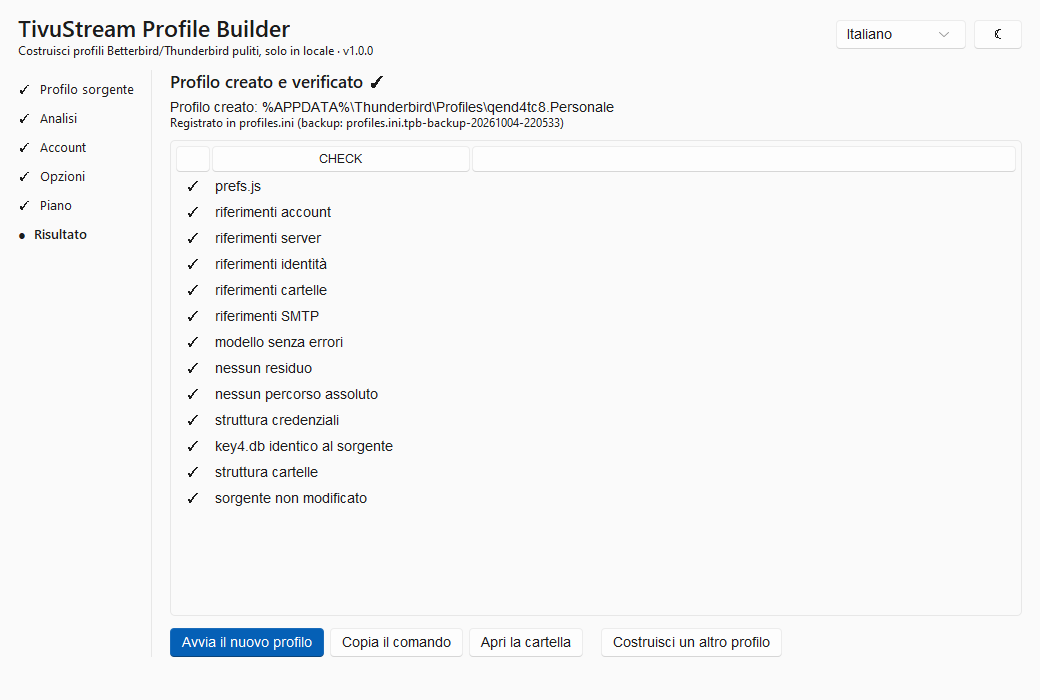
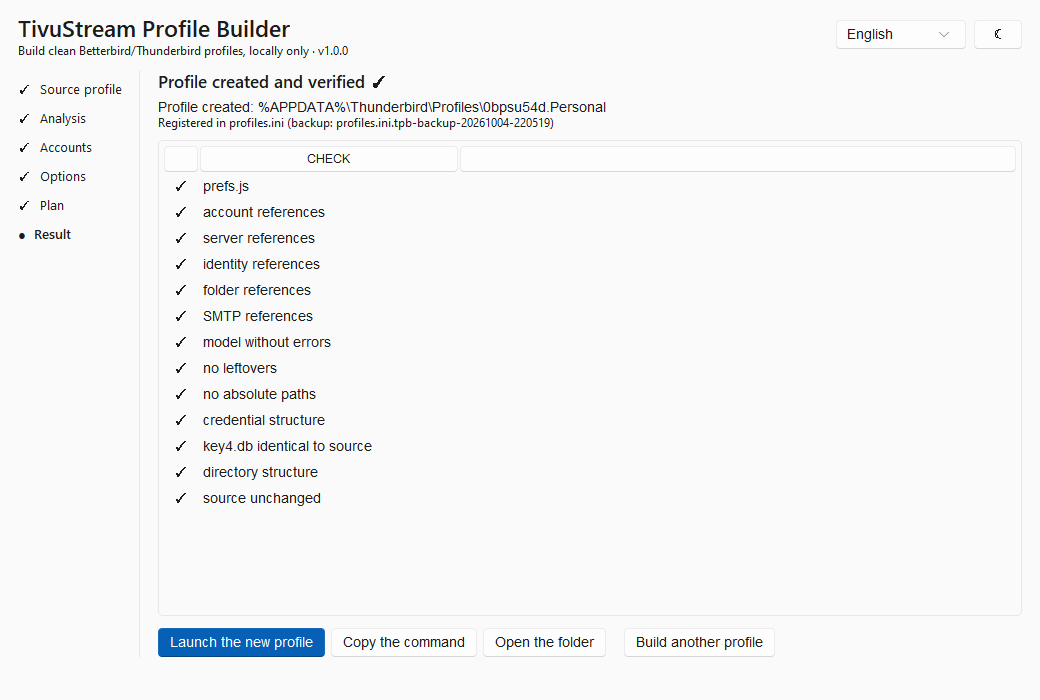
Leggi il piano: cosa viene copiato, cosa resta fuori e perché. Confermi, il profilo viene costruito, verificato in tredici punti e aggiunto all'elenco dei profili. Read the plan: what gets copied, what stays out and why. You confirm, the profile is built, checked on thirteen points and added to the profile list.

Cosa non fa maiWhat it never does

Un programma che maneggia la tua posta deve essere prudente per scelta, non per caso. Queste regole sono scritte nel codice e verificate dai test. A program that handles your mail has to be cautious by design, not by accident. These rules are written into the code and checked by the tests.

Al primo avvio del nuovo profiloOn first launch of the new profile

Meglio saperlo prima: ecco cosa succede quando apri il profilo appena creato. Better to know beforehand: this is what happens when you open the new profile.

Account con password (Posteo, IMAP classico): partono subito, senza chiederti nulla. Le cartelle vengono riscaricate dal server. Password accounts (Posteo, classic IMAP): they start straight away without asking anything. Folders are downloaded again from the server.

Più account Gmail o Microsoft nello stesso profilo: per ciascuno si apre la pagina di accesso del provider e va fatto un nuovo login. Non è un errore: i loro accessi salvati non si distinguono l'uno dall'altro senza decifrarli, e il programma non decifra mai nulla. Per non portare nel nuovo profilo anche gli accessi degli account esclusi, non ne copia nessuno. Se preferisci evitare il login, puoi scegliere di copiarli tutti. Several Gmail or Microsoft accounts in the same profile: each one opens the provider's sign-in page and needs a new login. This is not a failure: their saved sign-ins cannot be told apart without decrypting them, and the program never decrypts anything. To avoid carrying the excluded accounts' sign-ins into the new profile, it copies none of them. If you would rather skip the login, you can choose to copy them all.

Estensioni e messaggi salvati solo in Local Folders non vengono trasferiti: il piano te lo dice prima, così puoi reinstallare le estensioni e spostare i messaggi locali. Extensions and messages stored only in Local Folders are not transferred: the plan tells you beforehand, so you can reinstall the extensions and move the local messages.

Puoi controllarlo prima di fidartiYou can check it before trusting it

Il piano prima di tuttoThe plan comes first

Vedi l'elenco completo di cosa verrà copiato ed escluso, con il motivo di ogni scelta, prima che venga creato qualsiasi file.You see the full list of what will be copied and excluded, with the reason for each choice, before any file is created.

Verifiche automaticheAutomatic checks

Dopo la costruzione ogni riferimento viene ricontrollato: account, identità, server, cartelle, SMTP, credenziali, struttura.After the build every reference is checked again: accounts, identities, servers, folders, SMTP, credentials, structure.

Anche da riga di comandoCommand line too

Lo stesso motore è disponibile come tpb.exe, con simulazione (--dry-run) e configurazioni salvabili.The same engine is available as tpb.exe, with simulation (--dry-run) and reusable configurations.

Codice apertoOpen source

Tutto il codice è pubblico su GitHub con licenza GPL v3, insieme al modello di sicurezza e ai test. Puoi costruire il pacchetto da solo e confrontarlo.All the code is public on GitHub under the GPL v3, together with the security model and the tests. You can build the package yourself and compare.

InstallazioneInstall

Non c'è nessun programma di installazione: si scarica, si estrae e si avvia. Non serve Python. There is no installer: download, extract, run. Python is not needed.

  1. Scarica lo ZIP dalla pagina delle release su GitHub. Accanto trovi il file .sha256 per controllare che il download sia integro. Download the ZIP from the releases page on GitHub. Next to it you find the .sha256 file to check that the download is intact.
  2. Sblocca il file zip prima di estrarlo: tasto destro sullo zip, Proprietà, spunta Annulla blocco, OK. Evita l'avviso di sicurezza che Windows mostra al primo avvio dei file scaricati da internet. Unblock the zip before extracting it: right-click the file, Properties, tick Unblock, OK. This avoids the security warning Windows shows the first time you run a file downloaded from the internet.
  3. Estrai la cartella dove preferisci e chiudi Betterbird/Thunderbird. Extract the folder anywhere and close Betterbird/Thunderbird.
  4. Avvia TivuStream Profile Builder.exe e segui i passi. Se compare "Windows ha protetto il PC": Ulteriori informazioni → Esegui comunque (il programma non è firmato digitalmente). Run TivuStream Profile Builder.exe and follow the steps. If "Windows protected your PC" appears: More info → Run anyway (the program is not code-signed).

Domande frequentiFrequently asked questions

Il mio profilo attuale viene modificato?Is my current profile modified?

No. Viene solo letto. Il nuovo profilo è una cartella separata e alla fine il programma verifica che quello di partenza sia identico a prima. Puoi continuare a usarlo come sempre. No. It is only read. The new profile is a separate folder, and at the end the program verifies that the starting one is identical to before. You can keep using it as always.

Le mie password sono al sicuro?Are my passwords safe?

Il programma non le vede mai in chiaro: copia il database cifrato così com'è e filtra l'elenco delle credenziali usando solo i nomi dei server, che sono già in chiaro. Non c'è nessun codice di rete, quindi nulla può uscire dal tuo computer. The program never sees them in plain text: it copies the encrypted database as it is and filters the credential list using only server names, which are already in plain text. There is no network code, so nothing can leave your computer.

Perché Gmail mi chiede di nuovo l'accesso?Why does Gmail ask me to sign in again?

Perché con più account Gmail (o Microsoft) gli accessi salvati sono tutti uguali dall'esterno: per capire quale appartiene a chi bisognerebbe decifrarli. Per non portare nel profilo nuovo anche quelli degli account esclusi, il programma non ne copia nessuno e ti chiede un login per account. Se preferisci, nelle opzioni puoi copiarli tutti ed evitare il login. Because with several Gmail (or Microsoft) accounts the saved sign-ins all look alike from outside: telling which belongs to whom would require decrypting them. To avoid carrying the excluded accounts' sign-ins into the new profile, the program copies none and asks for one login per account. If you prefer, the options let you copy them all and skip the login.

Le email vengono copiate?Are my emails copied?

Con gli account IMAP le email stanno sul server: il nuovo profilo le riscarica da solo. Vengono copiate la configurazione degli account e, se vuoi, la rubrica personale. I messaggi salvati solo in Local Folders non vengono trasferiti, e il piano te lo segnala. With IMAP accounts your mail lives on the server: the new profile downloads it again by itself. The account configuration is copied and, if you want, the personal address book. Messages stored only in Local Folders are not transferred, and the plan tells you so.

Funziona con Thunderbird?Does it work with Thunderbird?

Il formato del profilo è lo stesso e Thunderbird viene riconosciuto. Oggi la versione verificata su profili reali è Betterbird 153; con altre versioni il programma funziona e te lo segnala nell'analisi. The profile format is the same and Thunderbird is recognized. Today the version verified on real profiles is Betterbird 153; with other versions the program works and tells you so in the analysis.

Posso creare più profili diversi?Can I create several different profiles?

Sì. Dallo stesso profilo puoi costruirne quanti vuoi: uno personale, uno per il lavoro, uno di prova. Le selezioni si salvano in file di configurazione riutilizzabili, che non contengono password né indirizzi in chiaro. Yes. From the same profile you can build as many as you like: a personal one, a work one, a test one. Selections are saved as reusable configuration files that contain no passwords and no plain addresses.

In quali lingue è disponibile?Which languages are available?

Italiano e inglese, con tema chiaro e scuro. Si cambiano in qualsiasi momento dall'angolo in alto a destra, senza perdere le scelte fatte. Italian and English, with light and dark theme. Switch at any time from the top-right corner without losing your choices.

Pronto a ripartire pulito?Ready for a clean start?

Scarica Profile Builder, guarda cosa c'è nel tuo profilo e decidi tu cosa portare con te. Fino all'ultimo clic non cambia nulla. Download Profile Builder, see what is in your profile and decide what to bring along. Nothing changes until the last click.

Windows 10 e 11 · Betterbird e Thunderbird · gratuito e open source Windows 10 and 11 · Betterbird and Thunderbird · free and open source